
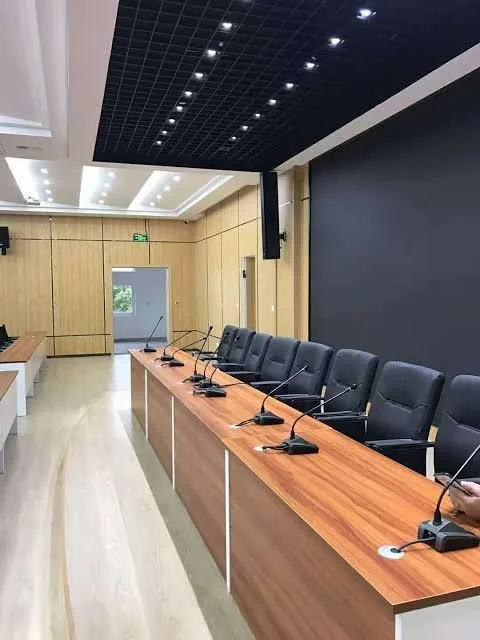
Speaker Guide For Business Spaces
Choose The Right Speakers For Your Boardroom
We make complex technology simple.
Great Audio Requires More Than Great Microphones
Many organizations focus heavily on microphones while overlooking the importance of speaker performance. In reality, speaker coverage plays a critical role in how clearly participants hear remote attendees and how natural conversations feel during hybrid meetings.
Deliver Consistent Audio
The right speaker system ensures every participant can hear clearly, regardless of where they are seated in the room.
Support Hybrid Collaboration
Professional speakers help remote participants sound natural and intelligible, creating a more engaging meeting experience.
Maintain a Clean Design
Modern boardroom speaker solutions can be integrated into ceilings or walls, keeping technology discreet while delivering exceptional performance.
How Do You Choose the Right Technology?
-
Room size, ceiling height, seating layout, and acoustics all influence speaker selection and placement.
-
Ceiling speakers, pendant speakers, wall-mounted speakers, and soundbars each serve different applications depending on the room and collaboration goals.
-
Ceiling speakers, pendant speakers, wall-mounted speakers, and soundbars each serve different applications depending on the room and collaboration goals.
How DVAI Designs Modern Boardrooms
We design boardroom AV systems by first understanding how the room will be used, rather than starting with specific products. Room size, seating positions, viewing distances, acoustics, collaboration platforms, network infrastructure and user expectations are considered before equipment is selected.
Assess → Design → Integrate → Commission → Support
Benefits to choosing the right camera
Deliver Consistent Audio
1
The right speaker system ensures every participant can hear clearly, regardless of where they are seated in the room.
Support Hybrid Collaboration
2
Professional speakers help remote participants sound natural and intelligible, creating a more engaging meeting experience.
Maintain A Clean Design
3
Modern boardroom speaker solutions can be integrated into ceilings or walls, keeping technology discreet while delivering exceptional performance.
“Signature Teams Boardrooms should pair microphones with distributed speakers to deliver clear sound from remote participants and create an inclusive hybrid meeting experience.”

About the Experts
DVAI is a business technology consulting and integration firm providing audiovisual, video conferencing, network and communications solutions. For more than 20 years, DVAI has worked with corporate, government, municipal and education organizations to design, integrate and support workplace technology environments.
FAQ’s
-
A modern boardroom typically includes one or more commercial displays, video conferencing cameras, microphones, speakers, audio processing, wired and wireless content sharing, and a simple room control interface. Many boardrooms also include a dedicated Microsoft Teams, Zoom or Google Meet conferencing system. The specific technology should be selected based on room size, seating layout, meeting types, acoustics, viewing distances and how users need to collaborate.
-
A boardroom AV system includes the complete audio, video, presentation and control technology within the room. A Microsoft Teams Room is a dedicated conferencing platform designed specifically to simplify joining and managing Teams meetings. A Teams Room can be part of a larger boardroom AV system that also includes displays, professional cameras, microphones, speakers, content sharing, room control and other integrated technologies.
-
Not every boardroom requires ceiling microphones. The right microphone solution depends on room size, ceiling height, acoustics, seating layout and how the room is used. Ceiling microphones can provide excellent coverage while keeping tables free of equipment, particularly in larger or more formal meeting spaces. Table microphones, microphone arrays and integrated video-bar microphones may be more appropriate in other rooms. Microphone selection should be based on required coverage and acoustic performance rather than appearance alone.
-
Many boardrooms use one or two displays, although the correct number depends on room size and how meetings are conducted. A single display may be sufficient for smaller spaces. Two displays are often beneficial in larger hybrid meeting rooms because one can display remote participants while the other shows shared content. Display size, resolution, viewing distance and sightlines are equally important. The goal is to ensure everyone can comfortably see both people and content from their normal seating position.
-
Boardroom cameras should be selected based on room dimensions, seating positions, required field of view and the distance between participants and the camera. Smaller rooms may work well with a wide-angle camera or video bar, while larger boardrooms may require optical zoom, PTZ cameras, multiple cameras or intelligent speaker-tracking systems. Camera placement is also critical. The objective is to provide remote participants with natural views of the people speaking without requiring users to manually operate the camera.
-
Yes. A boardroom can be designed to support Microsoft Teams, Zoom, Google Meet and other conferencing platforms. The appropriate approach depends on which platform the organization uses most frequently and how often users need to join meetings hosted on other platforms. Solutions can include dedicated room systems with supported cross-platform meeting capabilities, BYOD connectivity that allows users to run meetings from their laptops, or a combination of both approaches.
-
Yes. Existing boardroom technology can often be upgraded without replacing the entire system. Displays, speakers, microphones, cameras, cabling and other infrastructure may be reusable if they remain suitable for the room and compatible with the new design. An assessment of the existing AV system can identify which components should be retained, upgraded or replaced. This can reduce project costs while improving conferencing, content sharing, control and overall ease of use.
-
The cost of a commercial boardroom AV system varies considerably depending on room size, conferencing requirements and system complexity. A straightforward meeting room may require only a commercial display and integrated video conferencing system, while a large boardroom may require multiple displays, professional cameras, ceiling microphones, audio processing, room control and custom integration. Installation, programming, commissioning and training should also be considered. A room assessment and defined requirements are the best way to establish an accurate project budget.