
What is the Best Microphone System for Hybrid Meetings?
Choose Microphones Designed For Hybrid Collaboration
Expert advice, practical solutions, dependable results.
Modern Hybrid Meetings Depend On Better Audio
Research consistently shows that audio quality has a greater impact on meeting satisfaction than video quality. When participants cannot hear clearly, collaboration suffers regardless of how advanced the camera system may be.l Impact.
Beamforming
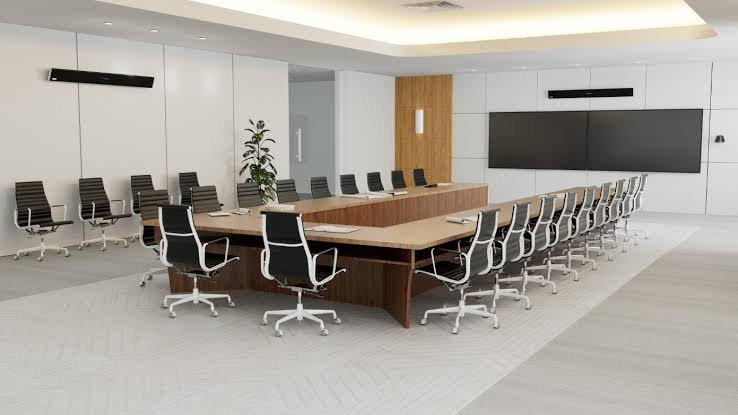
Beamforming ceiling microphones have become a preferred solution for many modern boardrooms and hybrid meeting spaces.
Hear Every Voice Clearly
The best microphone systems ensure all participants can be heard naturally, regardless of where they are seated in the room.
Ceiling Microphones
Ceiling microphones provide room-wide coverage while eliminating tabletop clutter and cable management issues.
Improve the Remote Experience
Hybrid meetings succeed when remote participants feel included in the conversation. Professional microphone systems help eliminate missed comments and repeated questions.
DSP’s
Professional DSP systems help improve speech clarity, reduce background noise, and support acoustic echo cancellation.
Keep Technology Out of the Way
Modern microphone solutions provide excellent coverage while reducing tabletop clutter and creating a cleaner, more professional meeting environment.
How Do You Choose the Right Technology?
-
For many modern boardrooms, beamforming ceiling microphone systems provide an excellent balance of coverage, aesthetics, and user experience. The ideal solution depends on the room and application.
-
In many business environments, yes. Ceiling microphones provide cleaner room aesthetics, flexible seating arrangements, and excellent room-wide pickup when properly designed.
-
This is often caused by inadequate microphone coverage, poor room acoustics, incorrect microphone placement, or insufficient audio processing.
How DVAI Designs Modern Boardrooms
We design boardroom AV systems by first understanding how the room will be used, rather than starting with specific products. Room size, seating positions, viewing distances, acoustics, collaboration platforms, network infrastructure and user expectations are considered before equipment is selected.
Assess → Design → Integrate → Commission → Support
What Makes a Boardroom AV System Easy to Use?
Standardize the user experience.
1
Rooms within the same organization should operate consistently.
Reduce the number of user decisions.
2
Joining a meeting shouldn't require users to understand signal routing or AV equipment.
Design microphones around coverage.
3
Microphone selection and placement should be based on seating positions, room acoustics and expected participant behavior.
Size displays around viewing distance.
4
Display size should be determined by the room and the content being viewed rather than simply choosing the largest available display.
Many modern conferencing, control and AV systems depend heavily on the network.
Design AV and network infrastructure together.
5
“When it comes to productive hybrid meetings, users rank excellent sound as even more important than video quality.”
About the Experts
DVAI is a business technology consulting and integration firm providing audiovisual, video conferencing, network and communications solutions. For more than 20 years, DVAI has worked with corporate, government, municipal and education organizations to design, integrate and support workplace technology environments.
FAQ’s
-
A modern boardroom typically includes one or more commercial displays, video conferencing cameras, microphones, speakers, audio processing, wired and wireless content sharing, and a simple room control interface. Many boardrooms also include a dedicated Microsoft Teams, Zoom or Google Meet conferencing system. The specific technology should be selected based on room size, seating layout, meeting types, acoustics, viewing distances and how users need to collaborate.
-
A boardroom AV system includes the complete audio, video, presentation and control technology within the room. A Microsoft Teams Room is a dedicated conferencing platform designed specifically to simplify joining and managing Teams meetings. A Teams Room can be part of a larger boardroom AV system that also includes displays, professional cameras, microphones, speakers, content sharing, room control and other integrated technologies.
-
Not every boardroom requires ceiling microphones. The right microphone solution depends on room size, ceiling height, acoustics, seating layout and how the room is used. Ceiling microphones can provide excellent coverage while keeping tables free of equipment, particularly in larger or more formal meeting spaces. Table microphones, microphone arrays and integrated video-bar microphones may be more appropriate in other rooms. Microphone selection should be based on required coverage and acoustic performance rather than appearance alone.
-
Many boardrooms use one or two displays, although the correct number depends on room size and how meetings are conducted. A single display may be sufficient for smaller spaces. Two displays are often beneficial in larger hybrid meeting rooms because one can display remote participants while the other shows shared content. Display size, resolution, viewing distance and sightlines are equally important. The goal is to ensure everyone can comfortably see both people and content from their normal seating position.
-
Boardroom cameras should be selected based on room dimensions, seating positions, required field of view and the distance between participants and the camera. Smaller rooms may work well with a wide-angle camera or video bar, while larger boardrooms may require optical zoom, PTZ cameras, multiple cameras or intelligent speaker-tracking systems. Camera placement is also critical. The objective is to provide remote participants with natural views of the people speaking without requiring users to manually operate the camera.
-
Yes. A boardroom can be designed to support Microsoft Teams, Zoom, Google Meet and other conferencing platforms. The appropriate approach depends on which platform the organization uses most frequently and how often users need to join meetings hosted on other platforms. Solutions can include dedicated room systems with supported cross-platform meeting capabilities, BYOD connectivity that allows users to run meetings from their laptops, or a combination of both approaches.
-
Yes. Existing boardroom technology can often be upgraded without replacing the entire system. Displays, speakers, microphones, cameras, cabling and other infrastructure may be reusable if they remain suitable for the room and compatible with the new design. An assessment of the existing AV system can identify which components should be retained, upgraded or replaced. This can reduce project costs while improving conferencing, content sharing, control and overall ease of use.
-
The cost of a commercial boardroom AV system varies considerably depending on room size, conferencing requirements and system complexity. A straightforward meeting room may require only a commercial display and integrated video conferencing system, while a large boardroom may require multiple displays, professional cameras, ceiling microphones, audio processing, room control and custom integration. Installation, programming, commissioning and training should also be considered. A room assessment and defined requirements are the best way to establish an accurate project budget.